What should I post on LinkedIn? (5 easy starting points)
This article explains how to overcome writer’s block on LinkedIn by using Latitude’s suggested ideas, personal experiences, industry perspectives, saved drafts, and AI assistance to create and publish meaningful content.
Written By Brenton Shiplett
Last updated 3 months ago
Quick ways to get unstuck
If you're staring at a blank screen wondering what to post, you're not alone! The hardest part of LinkedIn isn't writing - it's deciding what's worth saying. The good news is you don't need a perfect idea to get started. You just need a direction.
Start with a suggested idea in Content Creation
Write about a real experience you've had
Share a take on something in your industry
Revisit and finish a saved draft
Ask Latitude for new ideas based on a topic
1. Start with suggested ideas (fastest path)
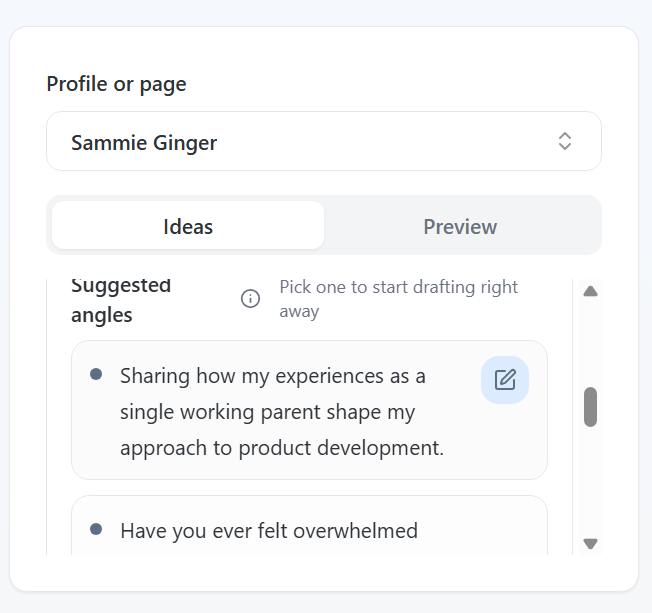
Latitude already generates ideas based on your strategy, goals, and audience.
Where to go:
Open Content Creation
Look under Suggested angles
You can:
Click a suggestion to instantly move it into the editor
Use it as-is or add your own context before generating a draft
If nothing stands out:
Enter a topic (e.g. "job searching" or "AI in product")
Click Generate Ideas to get more tailored suggestions
This is the fastest way to go from blank page -> real draft.
2. Share a personal story
You don't need to be an expert to post - you just need a perspective.
Some of the best-performing posts are simple experiences like:
A challenge you faced at work
A lesson from a recent project
Something that surprised you during your job search
Easy starting prompt:
"One thing I didn't expect about [situation] was..."
From there, just explain what happened and what you learned!
3. Share a point of view on your industry
You likely have more opinions than you think.
Start small:
What's something people in your field get wrong?
What's a trend you agree or disagree with?
What's something you've noticed others aren't talking about?
You don't need a "hot take" - just an honest one.
4. Revisit a saved draft
You may already have something worth posting.
Where to look:
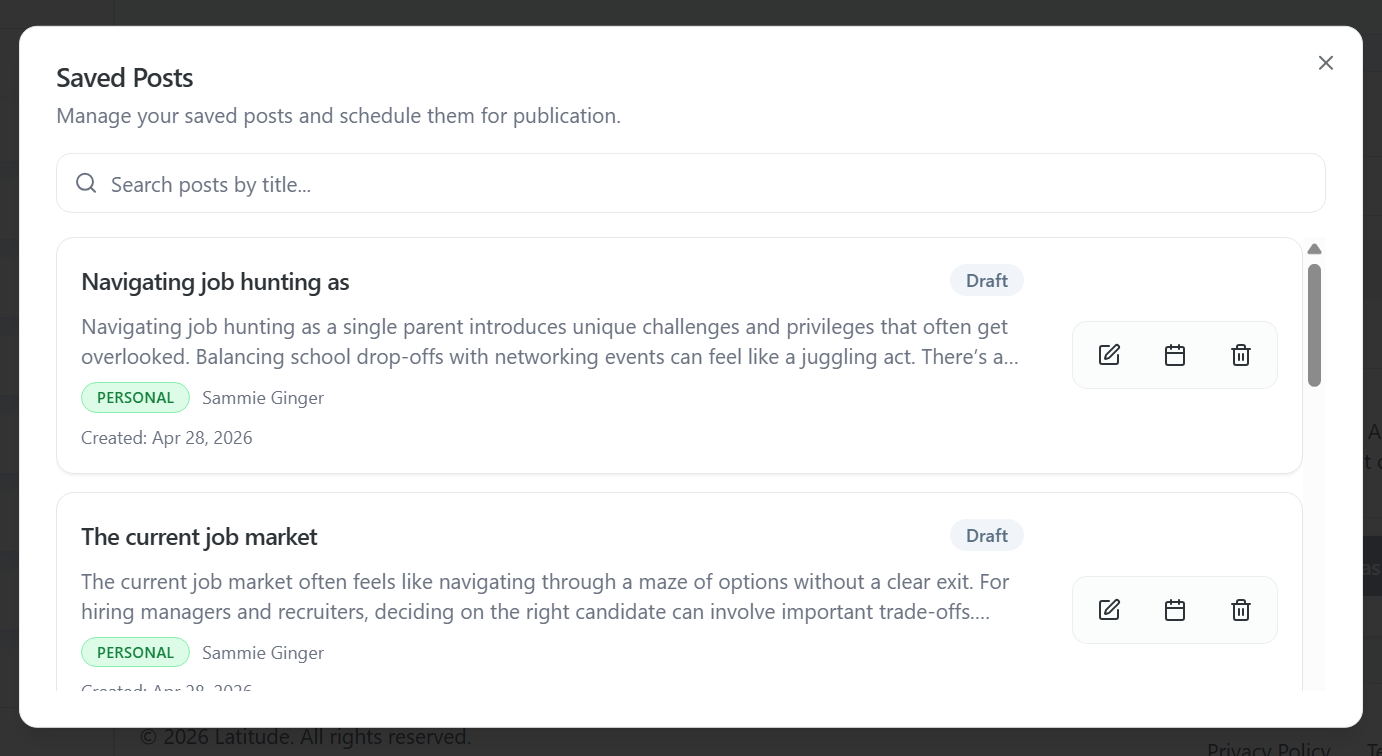
View Saved Posts in Content Creation
Or check drafts in the Scheduler
You can:
Open a draft
Edit or refine it
Schedule it when ready
Most people don't need a new idea - they just need to finish one they already started.
5. Use AI to build from a rough idea
You don't need to write a full post yourself.
In Content Creation, you can:
Type a rough idea or topic
Click Get AI Suggestion
Add guidance like:
"Make this more personal"
"Focus on job searching"
"Add a stronger opinion"
The more direction you give, the more it will sound like you.
A quick note on getting started
You don't need to post perfectly - you just need to post once.
That first post is what unlocks:
Momentum
Better recommendations
More personalized suggestions from Latitude
From there, it gets easier.
Want more help?
If you're still not sure what to post, you're not stuck - you just need a bit more direction.
You can:
Keep refining ideas inside Latitude
Reach out to support for guidance
Or use our managed services, where a content writer can help create and schedule posts for you - Please contact our team for more information!
Was this helpful?
Still need help? Ask the team